Your broadband speed affects how quickly you can browse, stream and connect at home. It varies based on your plan, your setup and how busy the network is. This guide explains the types of speeds, the tech behind them, and how to test or improve your connection.
Broadband speed is different to Wi-FI signal
- Broadband speed refers to the rate at which data flows from the internet to your hub or extender.
- Wi-Fi signal is the wireless transmission of data from your hub to your devices.
What affects your speed at home
Your device speed may be slower than the speed to your Hub.
This can be affected by:
- the number of devices connected
- whether you’re using Wi-Fi or a wired connection
- walls or furniture blocking your signal
- older devices
Types of broadband speed
Sync speed
This is the speed between your BT hub and your local cabinet or telephone exchange. It’s also known as line rate. It depends on the distance between your home and the cabinet or exchange, and whether things like microfilters are installed correctly.
Sync speed sets the upper limit for the speeds you’ll see at home.
Throughput speed
This is the actual speed your broadband uses to send and receive data between your BT Hub and the internet. It’s what you experience when browsing, streaming or gaming.
The speed you get to your devices:
- can’t be faster than your sync speed
- may slow down at peak times, usually 8 pm to 10 pm
- can be lower on individual devices depending on your home setup
Speed tests in My BT or a troubleshooter measure your throughput speeds to the hub.
Estimated, maximum and guaranteed speeds
When you join us, you’ll see several speed terms. Here’s what they mean.
The speeds we expect your line can reach, measured to your BT Hub. These can be slower at busier times when more people are online.
The speeds your line can reach at quieter times.
The minimum download speed you should receive to your hub at peak times. You can check your speed with a speed checker, or check your order confirmation email.
If your speed drops below this, contact us and we’ll work to fix it. If we cannot improve it within 30 days, you can leave your contract without penalty.
(We follow Ofcom’s Voluntary Code of Practice on Broadband Speeds.)
The minimum upload speed you should expect at peak times.
The download and upload speeds shown in advertising and your order confirmation. These are the speeds that at least 50% of customers on the same package get at peak times.
How broadband speeds are measured
Broadband is measured in megabits per second, written as Mbps. Each megabit contains 1,000,000 bits. The higher the Mbps, the faster your broadband.
Here’s the minimum broadband speed you need for common activities.
| Activity | Minimum broadband speed | ||
|---|---|---|---|
| Web Browsing | 1Mbps download | ||
| HD Video Streaming | 5Mbps download | ||
| Ultra HD streaming | 30Mbps download | ||
| Voice over IP | 256Kbps download and512kbps upload | ||
| Online gaming | 256Kbps download and 512Kbps upload | ||
| Video calling | 1Mbps download and upload | ||
|
How broadband technology works
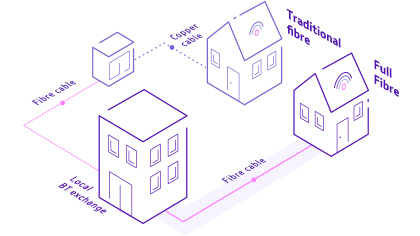
Broadband reaches your home using either copper or fibre cables.
Copper broadband
Used for ADSL and ADSL2+. Speeds get slower over longer copper lines.
Fibre broadband
More reliable than copper. There are two main types:
- Part Fibre
Fibre runs from the exchange to your street cabinet, then copper connects the cabinet to your home. Your distance from the cabinet affects your speed. Also referred to as Fibre to the Cabinet (FTTC).
- Full Fibre
A dedicated fibre line runs directly to your home. This gives the most reliable speeds, with no distance-related slowdown. Also referred to as Fibre to the Premises (FTTP).
Choosing the right broadband
There are 3 broadband options to choose from for your home.
Full Fibre
Our most stable and reliable broadband, up to 25 times faster than superfast fibre. Great for 4K streaming on multiple devices, smooth video calls, quick downloads and fast uploads.
Fibre
A superfast fibreoptic connection with average speeds around 67Mbps. Ideal for families or homes with lots of devices and HD streaming.
Standard broadband
Suitable for lighter use such as browsing, sending emails and using social media.
How to test your speed
Use the My BT app or the broadband troubleshooter. These tests show the speed coming into your BT Hub, which is the most reliable way to measure your connection.
Test your BT Broadband speed.
How to improve your broadband speed
If you’ve recently been connected, your speed may change for the first ten days while we optimise your line. Keep your Hub switched on to help us find the best speed. Try these tips to improve your broadband speed.
Stay Fast Guarantee
The Stay Fast Guarantee is a BT promise that you will receive the minimum broadband speeds specified in your contract.
If you're not getting your Stay Fast Guarantee
Get in touch, and we’ll investigate. If we cannot improve your speed within 30 days, you can leave without penalty.
More help is available on our "I'm not getting the expected Stay Fast Guarantee or minimum broadband speed" page.