Whether you're new to BT TV or already with us, you can enjoy Netflix as part of your TV package.
Entertainment and Entertainment Plus include Netflix Standard with adverts, while Full Works includes Netflix Standard. If Netflix isn't included in your package and you have a TV box, you can add it to your BT bill as a monthly Extra.
You can watch Netflix on your TV box using the Netflix app, or on compatible devices including smartphones, tablets and computers.
If you already have Netflix, there's no need to cancel. If you have Netflix with a third party, then you'll need to cancel this directly with them.
Entertainment and Entertainment Plus include Netflix Standard with adverts, while Full Works includes Netflix Standard. The cost is included in your monthly TV and broadband bill.
If you add Netflix as an Extra, you'll have a monthly rolling subscription that you can add or remove month-to-month. Charges appear under TV and entertainment on your BT bill.
Your Netflix billing dates may differ from other products on your bill, depending on when you activate the Extra.
Yes, you can log in using an existing active account. Just enter your existing account details into the Netflix app on your TV box by selecting Sign in.
Yes. You can watch Netflix on any supported device, including another TV Box if you have our Extra Box add-on.
The number of devices you can watch on at the same time depends on your Netflix plan. If you have Netflix Standard with adverts, you'll need a compatible TV Box such as the TV Box Pro or TV Box Edge to watch.
For more information, visit Netflix Help.
If you have parental controls set up on your TV box, you'll be prompted to enter your parental control PIN every time you enter the Netflix player on your box.
You can find help resetting your PIN here >
If you have Entertainment or Entertainment Plus, Netflix Standard with adverts is included. Full Works includes Netflix Standard.
Choose the Netflix plan that's right for you:
- Netflix Standard with Ads - watch and download in HD on two devices at the same time, with a few adverts.
- Netflix Standard - watch unlimited films and TV shows in HD on two devices at the same time.
- Netflix Premium - watch unlimited films and TV shows in 4K on four devices at the same time, subject to your internet connection and device capabilities.
You can upgrade your Netflix plan before checkout, when you activate Netflix, through My BT or directly with Netflix. If you already have Netflix Standard or Premium, you can keep your existing plan.
Struggling to activate? Manage your Netflix plan in My BT under TV and Sport > Plans and subscriptions, or open the Netflix app on your TV box.
If you add Netflix as an Extra, you can choose from:
- Netflix Standard with Ads - watch and download films and TV shows in HD on two devices at the same time, with adverts.
- Netflix Standard - watch unlimited films and TV shows in HD on two devices at the same time.
- Netflix Premium - watch unlimited films and TV shows in 4K on four devices at the same time, subject to your internet connection and device capabilities.
You can upgrade your Netflix plan before checkout, during activation, through My BT or directly with Netflix. If you already have Netflix Standard or Premium, you can keep your existing plan.
Struggling to activate? Manage your Netflix plan in My BT under TV and Sport > Plans and subscriptions, or open the Netflix app on your TV box.
You will need a compatible device or TV box to watch Netflix Standard with Ads; these are:
TV Box Pro

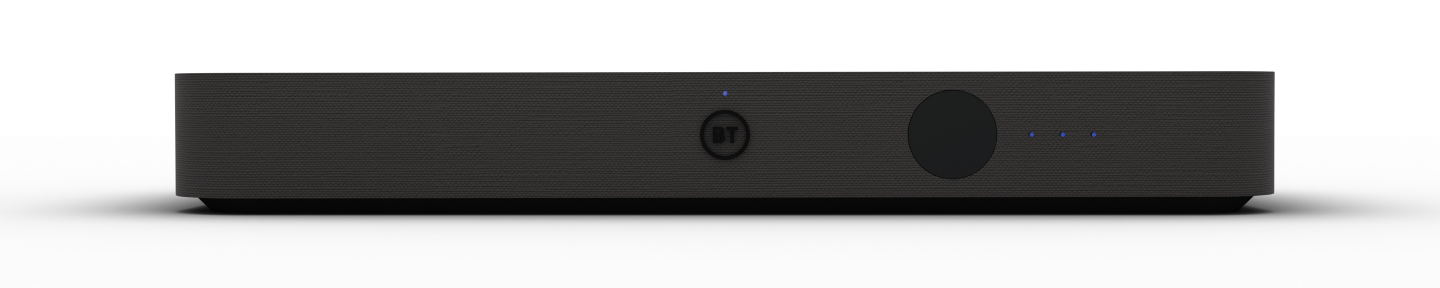
TV Box Edge


If you've tried to sign up for Netflix on your TV box and were redirected to this page, you'll need an activation link.
Get in touch and we'll send you the link.
To watch Netflix Standard with adverts on your TV box, you'll need a TV Box Pro or TV Box Edge.
If you change or recontract to Entertainment or Entertainment Plus and your TV box isn't compatible, we'll replace one box with a compatible model at no extra cost. If you have multiple incompatible boxes, we can only replace one.
You can also watch Netflix using the Netflix app on a compatible smart TV, computer, mobile phone or tablet.
If you've signed up for Netflix through BT TV, you'll need to activate it before you can start watching. You can create a new Netflix account or link an existing one.
Use the activation link in your order confirmation email, or go to TV and Sport in My BT. You'll be asked to enter an email address and password, and you'll have the option to upgrade your Netflix plan.
How you start watching Netflix depends on how you signed up:
- BT.com, in-store or over the phone - activate Netflix on your TV box before you start watching.
- Netflix app on your TV box - sign in to start watching.
Already have Netflix? Use the same email address when you sign up through BT to link your existing account.
You can keep your Netflix Standard with Ads, Standard or Premium plan, along with your profiles and viewing history.
If your Netflix subscription is billed through another provider, you'll need to cancel it with them directly.
When you link your existing Netflix account to BT, your Netflix billing will switch to your BT bill. You can keep your existing plan, profiles and viewing history.
If you pay for Netflix through another provider, you'll need to cancel your subscription with them directly.
Press the blue Home button on your remote, then go to Players & Apps to open Netflix.
If you've been redirected to this page while signing up for Netflix on your TV box, get in touch and we'll send you an activation link.
Sign in to My BT and go to Your products > TV and Sport to change your Netflix plan.
If Netflix is included in your TV package, any changes will appear on your next BT bill. You'll receive a pro-rata refund for any unused days.
You can also manage your plan directly with Netflix.
Yes. You can change your sign-in email address in Account on the Netflix website.
If Netflix is included in your BT TV package, you'll need to change your TV package to one that doesn't include Netflix.
To cancel Netflix as a TV Extra, go to Account on the Netflix website.
You can continue watching until the end of your current billing period. There are no cancellation fees, but you won't receive a refund for any unused days.
If you paid for Netflix before joining BT TV, Netflix will contact you about continuing your subscription.
Otherwise, your Netflix subscription will end when your BT TV service ends.
This error appears if your device or TV box doesn't support Netflix Standard with adverts. You'll need a TV Box Pro or TV Box Edge to watch on your TV box.
If Netflix Basic is included in your current TV package, you can keep it until you change or recontract your package. You'll then move to Netflix Standard with Ads and won't be able to switch back to Netflix Basic.
Netflix Standard with Ads includes adverts in most TV shows and films. Some titles aren't available due to licensing restrictions and will show a lock icon.
Adverts aren't shown on Kids' profiles or in Netflix games. When adverts do appear, they can't be skipped or fast-forwarded.
Find out more about Netflix ad-supported plans.
To recover your Netflix sign-in details, visit Netflix Help and search for forgotten password or forgotten email.
When you move home, you can continue watching Netflix on any compatible device.
If Netflix is included in your BT TV package, remember to tell us you're moving so we can move your TV service to your new address.
Netflix charges may not align with your BT billing cycle, but you won't be overcharged.
If you've upgraded the Netflix plan included in your TV package, the additional charge will appear on your BT bill.
Get more help with your BT bill.
Find out how to manage parental controls in the Netflix Help Centre.
If you already have Netflix as a monthly rolling Extra and move to a TV package that includes Netflix, we'll automatically move your existing Netflix account across.
There'll be no interruption to your service and you'll keep your current Netflix plan. You don't need to do anything.
If you move from Netflix included in your TV package to Netflix as an Extra, you'll need to reactivate your account. The same applies if Netflix asks you to add a payment method.
You won't lose your profiles or viewing history when you reactivate.
- Go to Account on the Netflix website.
- Select Cancel your membership, then Finish cancellation.
- Sign out of the Netflix app on your TV box by going to Get Help and selecting Sign out.
- Reactivate Netflix and sign in to your existing account.
Go to Get Help at the bottom of the Netflix app, then select Sign out.
Netflix Profile Transfer can't be used to create a new account that's billed through BT.
Find out more about Netflix Profile Transfer.
You can't add an extra member to a Netflix account that's paid through BT.
Find out more about Netflix extra members.
Find out how to share your Netflix account in the Netflix Help Centre.
Find out more about managing your Netflix Household.
Find out more about using Netflix while travelling.