If you're having a problem with your phone equipment, there are a few simple checks you can do find out what's wrong.
Got Digital Voice as your home phone? Please review this Digital Voice fix a problem page.
Quick checks
Doing these quick checks could fix the problem straight away, saving you from having to call us.
- Check that everything connected to the telephone socket is firmly plugged in.
- Check that your equipment is properly connected to the mains electricity if necessary.
- If your device uses batteries, check if they need changing.
If your telephone socket looks like this:
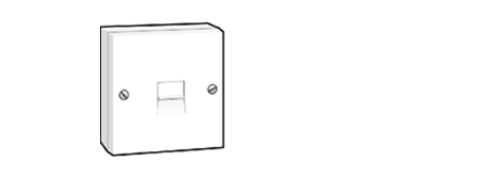
Or is a non-standard socket, you’ll need to unplug all equipment connected to every telephone socket in your home. This includes:
- all other telephones.
- answer machines.
- splitters / microfilters.
- digital TV boxes.
- broadband micro filters.
- any plug-in extension wiring.
- anything else you've currently got connected.
Now, plug a telephone into your Primary socket and try your connection. If you still have no service, try a second phone to rule out the phone itself as the cause.
These steps should help you troubleshoot any potential issues with your phone line in your home.
If your phone socket looks like one of these

Remove the face plate by undoing the two screws, if you're able to.
Then pull the lower part of the face plate forwards gently, as any extension wiring is connected to the rear of this face plate.

On the right-hand side you’ll find a test socket, connect a telephone – preferably a corded phone – directly to the test socket.
Now, try your connection again. Using this test socket has disconnected all internal wiring and devices, so if your service is working now, it means that something in your home was causing the problem. You’ll need to check out all the phone extensions and any devices connected to the phone line one by one, to find the piece causing the problem.
If you’re still having a problem, please contact us by reporting it and we’ll work to fix it as quickly as possible.