If you've received an email that claims to be from BT and you're not sure it's genuine, this guide will help you spot scam emails and keep your details safe.
All BT Broadband customers have Web Threat Protect, or Hub Threat Protect, and Cyber Threat Protect included as standard in their plans. These can keep you safe online by blocking harmful websites or warning you about threats.
Is this email genuine?
Scam emails are designed to look real, but BT will never:
- Ask you for your passwords or bank details.
- Send unexpected attachments.
- Ask you to click links to verify your account on bt.com.
If an email includes any of these, treat it as suspicious.
What to do straight away
If something doesn't feel right, stop and:
- Don't click any links.
- Don't reply.
- Forward it to phishing@bt.com.
- Delete the email.
These actions help keep your information safe and help BT act quickly against scammers.
You can log in securely at bt.com/mybt to check your account details and view your bill.
How to spot a scam email
Look out for:
Unexpected or urgent language
Messages that try to panic you into acting fast.Generic greetings
For example, "Dear customer" instead of your name.Incorrect sender address
The display name might look familiar, but the real email address is often unusual.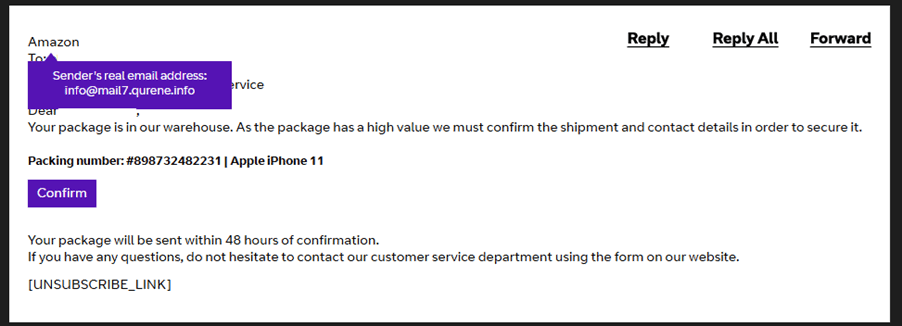
Poor spelling or formatting
A common giveaway.Hover‑over links that don’t match the website
Move your cursor over a link without clicking it to see where it really goes. If the address looks unusual, delete it.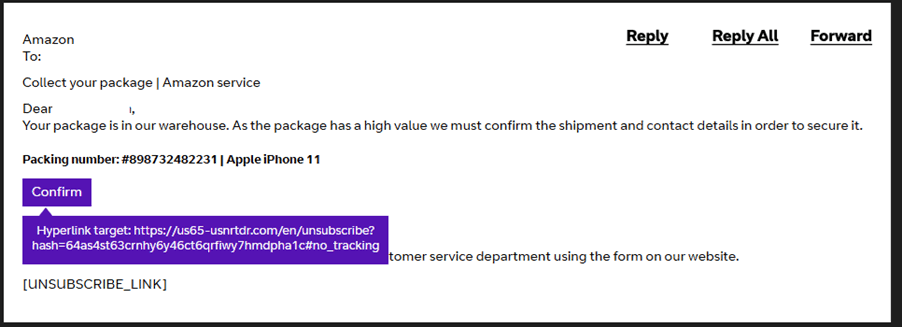
What these terms mean
What is spam?
Spam is like junk mail for your inbox. It's made up of unwanted emails you didn't ask for. Most email services, including BT Email, try to block these using spam filters.
Not all unwanted emails are spam. Marketing emails from companies you know, such as your energy provider or a shop you've used before, are legal and usually include a safe unsubscribe link.
Some spam emails also try to trick you into giving personal information. This is known as phishing.
You can get more help at bt.com/scams
What is phishing?
Phishing is when scammers impersonate a trusted organisation, such as BT, to trick you into sharing details like usernames, passwords, or bank information.
These emails often use copied logos and branding to look real.
Never click suspicious links or give personal information in an email you don't trust.
What is spoofing?
Spoofing is when someone sends emails that appear to come from your address, even though you didn’t send them. It usually means your account details have been accessed. Scammers may also use your contacts to send out more fake messages.
What to do if you've already clicked or shared details
If you've interacted with a suspicious email, act quickly:
Change your BT password
This helps secure your account.Run anti-virus software
A full scan checks your device for threats.Contact your bank if you entered any financial information
They can protect your account from fraudulent transactions.Monitor your BT account activity
Look out for anything you don’t recognise.
Forward the suspicious email to phishing@bt.com, then delete it.
Ways of staying protected
There are simple steps you can take to reduce your risk of scams and keep your information secure.
Use strong, unique passwords
Avoid reusing passwords across accounts. A trusted password manager can help you create and store secure passwords.Keep your software up to date
Install updates for your phone, tablet or computer. They fix security issues that scammers often target.Use a secure internet connection
Avoid checking email on public or unsecured Wi-Fi, where your details can be exposed.Turn on security tools
All BT Broadband customers have Cyber Threat Protect and Web Threat Protect or Hub Threat Protect included as standard in their plans. These can keep you safe online by blocking harmful websites or warning you about threats.Be cautious with marketing and sign‑up forms
Watch for opt‑in boxes when signing up for websites and uncheck anything that signs you up for marketing. Use a spare email address for sites you don't fully trust.Do not interact with spam
Don't reply to spam emails and avoid clicking 'unsubscribe' on anything suspicious.
Turn off automatic image loading, as some spammers use it to track when you open an email.Keep your email address private
Avoid posting your email address publicly where scammers can collect it.Manage unwanted emails wisely
Create folders and rules to organise marketing emails, mark spam as spam to improve filtering and block senders you no longer want to hear from.Sign out fully on shared devices
Always log out of your email on family computers, library PCs or borrowed mobiles.Check the sender’s real email address
On mobile, tap the sender’s name to see the full address.
On desktop, hover your cursor over it.
If you ever feel unsure about an email or message, stop, check, and use the steps in this guide to stay safe.
If you see something illegal
If an email contains disturbing or illegal content, such as child abuse material, report it immediately to the Internet Watch Foundation: www.iwf.org.uk
More help
You can find more support here:
- Report abuse or suspicious emails - phishing@bt.com
- BT scams hub - bt.com/scams
- Using BT Mail's anti-spam features