All our Hubs have wi-fi as standard and it's easy to connect a whole range of computers and devices to them. All you need is the Hub's network name (SSID) and password. Click on a..............
All our hubs have Wi-Fi as standard, and it's easy to connect a whole range of computers and devices to them. All you need is the hub's network name (SSID) and password. Click on the dropdown for your hub to get started.
- Check that your Smart Hub is switched on.
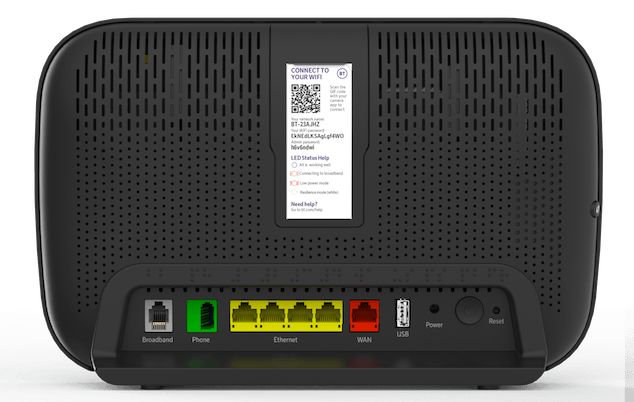
- Make a note of your hub's wireless network name (SSID) and password. They're on the back of your hub. Your hub will be called something like BT-XXYYXX. If your device supports WPS, just press the WPS button on your Hub - it's a quick way to connect.
Need help setting up your hub?
Find out about Connecting and set up of your BT Smart Hub
- Check that your Smart Hub is switched on. The wireless light only comes on when there's a problem, so it should be off.
- Put your device close to the hub so you get a good signal during setup.
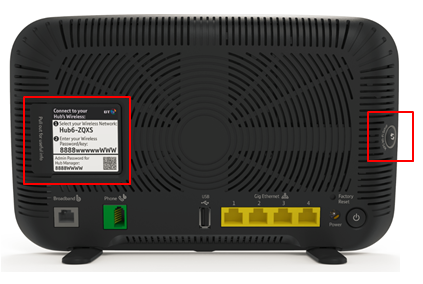
- Make a note of your hub's wireless network name (SSID) and password. They're on the back of your hub. Your hub will be called something like BT-XXYYXX. If your device supports WPS, just press the WPS button on your Hub - it's a quick way to connect.
Need help setting up your hub?
Find out about Connecting and set up of your BT Smart Hub
- Check that your BT Smart Hub is switched on. The wireless light only comes on when there's a problem, so it should be off.
- Place your device close to the hub to ensure a good signal during setup.
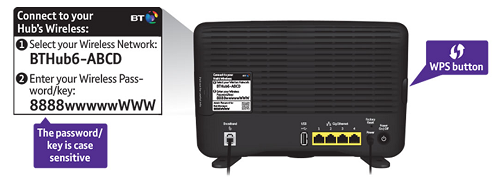
- Make a note of your hub's wireless network name (SSID) and password. They're on the back of your hub. Your hub will be called something like BTHub6-ABCD. If your device supports WPS, just press the WPS button on your hub - it's a quick way to connect.
Need help setting up your hub?
Find out about Connecting and set up of your BT Smart Hub
- Check your BT Smart Hub is switched on. The wireless light only comes on when there's a problem, so it should be off.
- Put your device close to the hub so you get a good signal during setup.
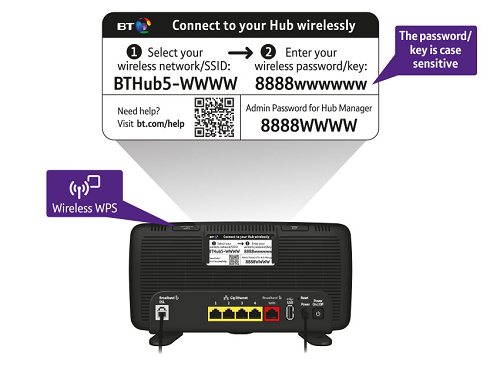
- Make a note of your hub's wireless network name (SSID) and password. They're on the back of your hub. Your hub will be called something like BTHub5-WWWW. If your device supports WPS, just press the WPS button on your Hub - it's a quick way to connect.
Need help setting up your hub?
Find out more about Connecting and set up of your BT Smart Hub
- Check that your BT Smart Hub is switched on and check the wireless light is on.
- Put your device close to the hub so you get a good signal during setup.
- Make a note of your hub's network name (SSID) and wireless key (password). You'll find this on the bottom or back of the Hub.
Need help setting up your hub?
Next, click on a dropdown to get help connecting different devices and operating systems.
For instructions on connecting your device, see our device user guides. These include information for tablets and Kindles, not just mobiles. Use the search to find instructions for your particular device.
If we haven't covered yours, check the manufacturer's site for more help.
We've also produced some videos to show you how to connect certain devices to your BT hub:
iPad
For instructions on connecting your games console to your BT hub, have a look at the manufacturer's website:
This video will show you how to connect your Nintendo Wii to your hub.
- If you've already connected using an Ethernet cable, unplug this now.
- Make sure your Mac has "Airport". This is Apple's name for its wireless technology, and most recent Macs have it installed as standard. If not, you'll need an Airport card or a third-party wireless adapter.
- Click on the "Airport" icon (turning Airport on if necessary) to show a list of wireless networks that are in range of your computer.
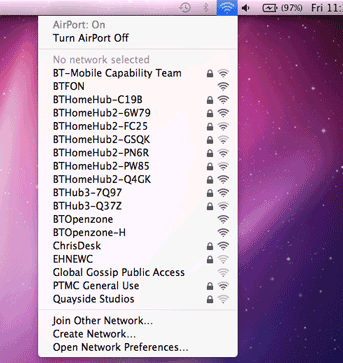
- From the list find your Hub's network name (SSID) and click on it
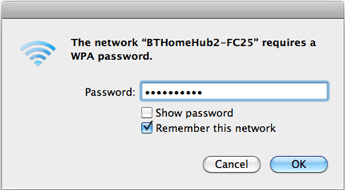
- Enter the Hub's wireless key. If you've got OSX 10.4 ("Tiger") then you need to put $ in front of the key. Make sure you've ticked "Remember this network". Click OK to finish.
- To check you're connected to your Hub, click on the Airport Status. You should see a tick next to your Hub's name.
Connecting to other wireless networks
You can use these instructions to set up connections to other wi-fi networks. Once you've identified the network you want to connect to, then enter the network password to join it. With some public Wi-Fi networks, you don't need a password.
Connecting to EE WiFi
As a BT Broadband user, you get access to a wide network of wireless hotspots, mainly through other people's Hubs.
How do I connect to an EE WiFi wireless hotspot?