Product details
Broadband home wi-fi network
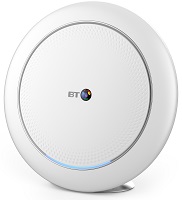
- Works with all broadband providers
- AX3700 Tri-Band wireless technology
- Wi-fi roaming and band steering
- Easy set-up. The app guides you to create and set up your Whole Home Wi-Fi system in minutes
- Simple dashboard to see who's online and what devices are connected
- Access controls to pause internet for individual devices, groups of devices, or for everyone
- View, block and rename devices in the app so they're easier to recognise
- Guest Network gives a separate wi-fi for your guests
- Data usage statistics for individual devices and groups of devices by hour, day, week and month
- Secure. Peace of mind that your home network is safe and secure
Benefits
Why should I choose a BT Whole Home Wi-Fi product?
Whole Home Wi-Fi gives seamless, superfast wi-fi in every room, with mesh wi-fi that automatically connects you to the fastest signal all around your home.
Whole Home Wi-Fi directs devices to the best signal
The software actively directs devices to the strongest connection signal using the 802.11k and 802.11v standards (when supported).
Compatibility
Are the different BT Whole Home Wi-Fi products compatible with each other?
No, the Whole Home Wi-Fi products - Whole Home Wi-Fi, Mini Whole Home Wi-Fi, Premium Whole Home Wi-Fi and Whole Home Wi-Fi 6 are not compatible with each other. So you can't use Whole Home Wi-Fi discs with Mini Whole Home Wi-Fi discs, for example.
What type of hub is Whole Home Wi-Fi compatible with?
BT Whole Home Wi-Fi products are compatible with all broadband hubs and routers with an RJ45 Ethernet port.
Software updates
How can I check for firmware updates?
Please make sure all your discs are switched on and connected before attempting to update the firmware.
In the Whole Home Wi-Fi app:
- Select Settings
- Select Firmware Update
- The current firmware version number is displayed together with the 'Last Updated' time and date. Select Check for Updates
- If an update is available, there will be an option to Update Firmware.
- Select this and follow the instructions.
Are firmware updates automatic?
Automatic Updates is the default for firmware upgrades, but you also have the option to turn these off, or to manually set your preferred time for updates.
Automatic firmware updates will install between 1 am and 5 am, but you can choose the start time of a four-hour window, so the firmware can be installed at a more convenient time. Make this change in the Whole Home Wi-Fi app under Settings, then select Firmware Updates.
Please note you'll lose connection to your wi-fi network while the firmware is updating.
I'm being prompted to update my disc firmware. Why do I need to do this?
New firmware will enable all the features in the latest version of the app.
System requirements
Should I turn off my hub (router) wi-fi?
Turning off your hub (router) Wi-Fi may improve your Whole Home Wi-Fi performance, particularly when there are many other wireless networks.
There's no need to turn off your hub’s wi-fi. Just remember to ‘forget this network’ on your devices for your hub, and make sure you're connected to the Whole Home Wi-Fi network.
Does Whole Home Wi-Fi support Power over Ethernet (IEEE802.3af)?
No, Whole Home Wi-Fi can only be powered by the included AC adapter(s).
Does Whole Home Wi-Fi support multiple WLANs including a guest network?
Yes. Whole Home Wi-Fi supports both normal SSID and Guest Network WLAN for both 2.4GHz and 5GHz.
How many discs are supported on one network?
Eight discs are currently supported.
Download the Whole Home Wi-Fi app
Set up Premium Whole Home Wi-fi easily with the app - available for:
- Android version 5.0 and above
- iOS version 9 and above
To download the app, open your phone or tablet's browser and go to bt.com/WHW/app >
Documents
 You will need Adobe Reader to view PDF documents
Product helpdesk information
If your product is within warranty:
By phone: 0808 100 6116
Monday to Friday 9.00am to 5.30pm
Saturday 9.00am to 2.00pm
By email: btconnectedhome@bt.com
If your product is out of warranty, please call the Technical Help and Support Desk on 0808 100 6116.
- How can I reset my Whole Home Wi-Fi to the default settings?
- Can I access the Whole Home Wi-Fi settings using a web browser?
- What's a Guest Network and how do I set it up?
- How can I see who is connected to my home network?
- What are Access Controls and how do I turn internet access on or off?
- What are groups for and how can I set up a group?
- Can I permanently block a device and how can I set this up?
- What does Pause do?
- Can I exclude devices from the Pause function?
- Can you rename devices so that they’re easily recognisable?
- What is the Wireless Network Name (SSID) and Wireless Password/Key?
- How can I change the Wireless Network Name (SSID) and Wireless Password/Key?
- What is the Admin password and where can I find it?
- What versions of Android and Apple iOS will the BT Whole Home Wi-Fi app work with?
- Do I need the Whole Home Wi-Fi app to connect to the network?
- How can I download the Whole Home Wi-Fi app?
- How can I run the app’s set-up again?
- Can I install the app on a Windows phone?
- Can I use the app with multiple Whole Home Wi-Fi network instances?
- Why does the app need permission to use location information on Android devices?
- I'm being prompted to update my app to a new version - why do I need to do this?
- Why are some of my devices not connected to the nearest Whole Home Wi-Fi disc?
- I am prompted with the following message during initial set-up of the app and discs: "You are not connected, turn device Wi-Fi on"p
- I’ve installed my discs, but my speed is slow and my wi-fi coverage has not improved.
- While adding a new disc to my Whole Home Wi-Fi network, the app shows a connection error message.
- My discs feel warm. Is this normal? Are there any safety precautions for the discs?
- I've paused my Whole Home Wi-Fi, but some of my devices/clients still have access to the internet.
- Can I change the default wi-fi channels on Whole Home Wi-Fi to avoid interference?d
- I'm trying to update to the latest firmware, but keep seeing a message stating "There is a problem completing the firmware update… please try again in a few minutes".
- The web browser user interface is showing blank pages when I select or click on a heading, sub heading, feature or status page.
- I see a red banner with 'There’s a problem with your Internet connection'.
- My Xbox 360 won't connect to the Whole Home Wi-Fi network. What can I do?
- I've recently changed my hub (router) and can no longer gain internet access via Whole Home Wi-Fi
- I've changed the Wireless Network Password/Key and now forgotten it, what can I do?
- I've changed the Admin password and now forgotten it, what can I do?
- What does the orange LED on the disc mean?
- What does the symbol before the disc name mean?
- I've updated my app and can't find the network map?