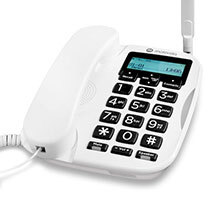
Digital Voice FW500 hybrid phone
How it works
Your FW500 works with your Digital Voice service by connecting to your Smart Hub. If there’s a power cut or broadband outage, it switches to its built-in SIM so you can make emergency calls over the mobile network.
Important things to know
- Keep it plugged in - Always keep your FW500 plugged into the green port on your Smart Hub and plugged into a power socket. This keeps the battery charged for emergencies.
- Emergency use only - The SIM comes with a limited number of minutes. Use it only when needed. You can always call 999, even if your minutes run out.
- Your mobile number - Find your FW500's mobile number on the leaflet in the box. Keep it safe.
- Signal strength Check the signal indicator and keep the antenna upright.
Battery life
- Up to 8 hours on standby
- About 1 hour of talk time during an outage
What happens during an outage
- If there's a power or broadband outage, any active calls will drop.
- You can then use your FW500 to make emergency calls over the mobile network.
- If the power comes back while you're on a call, it will continue on the mobile network. When you hang up, the phone switches back to Digital Voice.
- If someone tries to call your landline number during an outage, they'll reach your voicemail or hear an engaged tone.
Product helpdesk information
By phone: 0330 123 4150
Monday to Friday, 8am to 9pm. Saturday to Sunday, 8am to 8pm